Features › Keyboard and trackpad
Remapping keys and running macros on gestures
You can remap keys, give Caps Lock two jobs, turn Hyper or Fn into a keyboard of layers, and run a macro on a trackpad gesture. Each rule can be scoped to one app, and each one is a macro you can open. Karabiner-Elements and BetterTouchTool users can import what they have.
Coming soon See pricing
What it does
Caps Lock should be Escape when you tap it and Control when you hold it.
A dual-role remap in Settings › Remaps. The tap threshold is 200 ms unless you change it, and Hyper on Caps Lock works the same way.
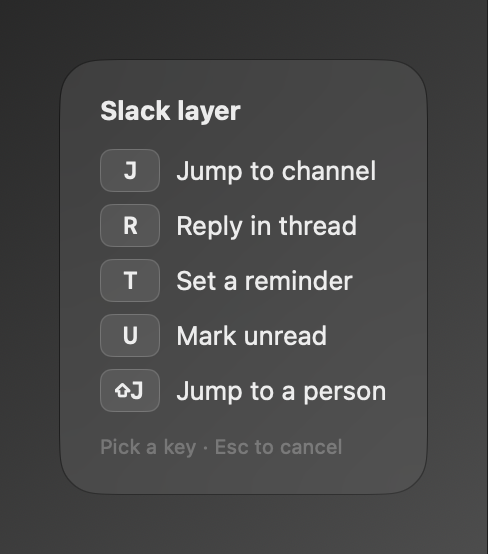
Hyper+S, then J, should open your Slack channel switcher.
Give the Slack group a layer on Hyper. While it is live a HUD lists the keys and every key you press belongs to it. A key it has no macro for is swallowed (“Nothing on J”), and Esc leaves. In Xcode the same key is Xcode’s.
A three-finger swipe left should go back in Safari.
A gesture trigger tied to Safari, with the number of fingers, the kind of gesture and its direction. A gesture for the front app beats one for every app. Two-finger swipes have to be quick flicks, because two fingers also scroll.
Two macros both want ⌘K.
Neither runs, and a panel asks which you meant. Scope the groups to different apps and the clash goes away.
You want the Globe key as a modifier.
fn+cmd+t is a valid hotkey, and Fn is never swallowed on its own. Set Press 🌐 key to Do Nothing in System Settings, or the emoji picker will get in the way.
How it works
- Settings › Remaps holds simple remaps and dual-role keys. Everything else is a hotkey or gesture trigger on a macro.
- Give a group a layer in its inspector and choose how long it stays live: for the next key, while held, or until Esc.
- Scope the group to an app. Its keys and gestures belong to that app and fall through everywhere else.
- Press ✦H
- Show “Hello from Hyper H”
Read the docs
- Keyboard shortcutsEvery keyboard shortcut in Switchboard's menus and panels, and the key spec syntax used by Press keys and hotkey triggers.
- TriggersEvery way a macro can start, how conflicts and scopes decide which macro runs, and how to find out why a trigger did not fire.
- Trackpad gestureRuns the macro on a multi-finger trackpad swipe, tap or pinch.
- Coming from Karabiner-ElementsHow Karabiner-Elements remaps, dual-role keys, layers and complex modifications map to Switchboard, and what the import keeps, notes or leaves out.
- Coming from BetterTouchToolHow every BetterTouchTool trigger and action maps to Switchboard, what runs in the Window extension, and what the import records or leaves out.