Features › Imports from 13 apps
Importing your existing library
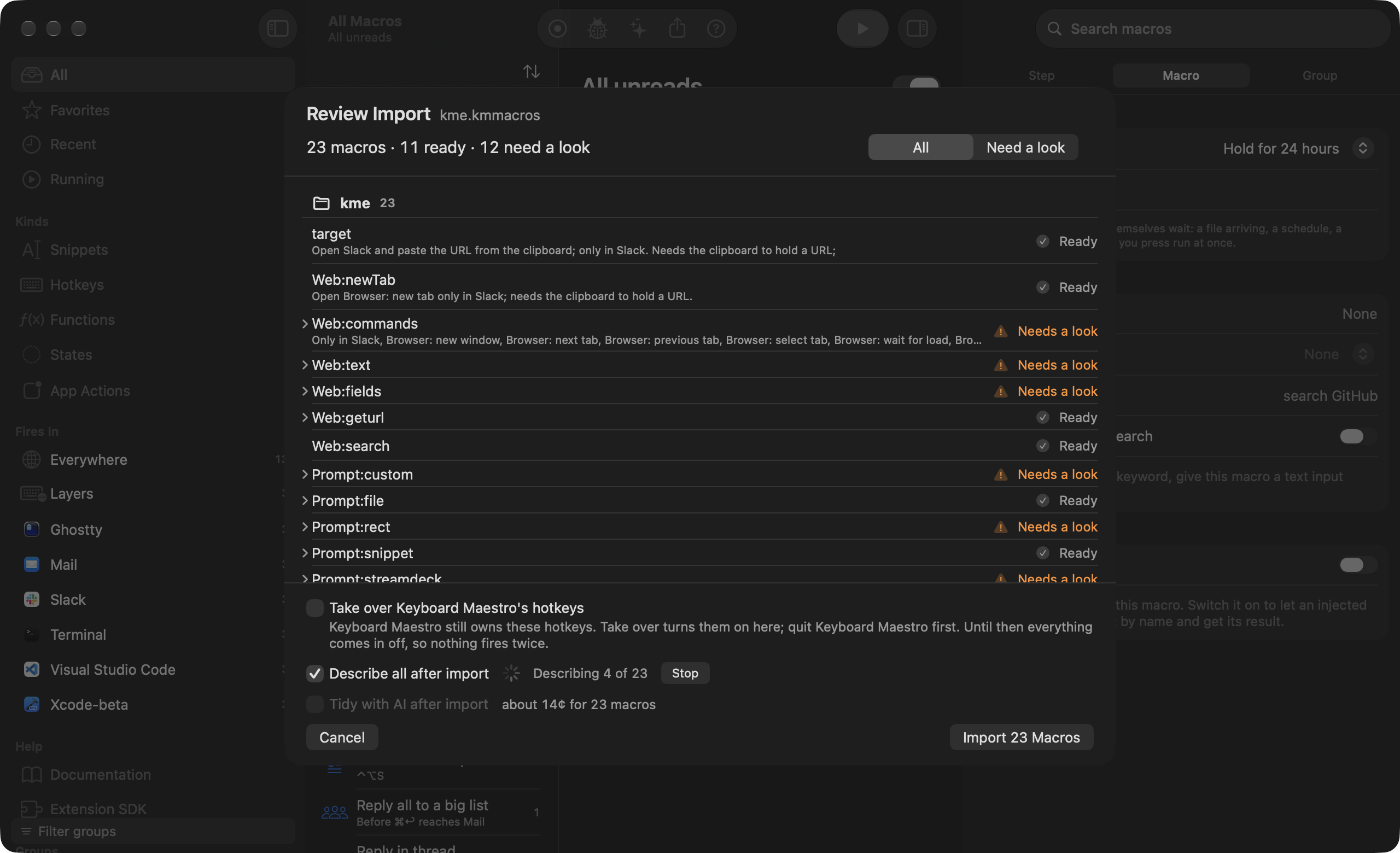
If you’re buying Switchboard you’re probably leaving something, and I’d rather you didn’t have to start over. Importers read 13 apps: Keyboard Maestro, BetterTouchTool, Karabiner-Elements, Alfred, Raycast, LaunchBar, Hazel, Automator, Shortcuts, TextExpander, PopClip, Stylus and userscripts, plus macOS text replacements. Each becomes macros you can open, and nothing is deleted on the other side. Anything that can’t be converted is marked Not supported in the review, with the reason.
Coming soon See pricing
What it does
You have eight years of Keyboard Maestro macros.
File › Import… opens a review of what comes across and what needs a look, before anything is saved. Groups become groups and arrive turned off, so Keyboard Maestro keeps its hotkeys until you turn each group on here.
Your gestures live in BetterTouchTool.
Export a preset (Presets › Export) and import the .bttpreset. Each trigger and action pair becomes a macro. An app’s triggers become a group scoped to that app, and global ones go in a group called Everywhere.
Caps Lock is Hyper in Karabiner-Elements.
Import reads karabiner.json directly. Dual-role keys, complex modifications and the Vim-arrows layer idiom arrive as remaps and layer groups, and what the tap cannot do is listed with a reason, not dropped. Quit Karabiner first, so nothing doubles.
~/Downloads has Hazel rules that sort everything.
Each watched folder becomes one macro, with the rules as labelled blocks in Hazel’s order over real file steps: move, rename with tokens, tag, trash, archive.
Your launcher keywords are in Alfred and Raycast.
Alfred’s workflows, web searches and snippets come across, and so do Raycast’s script commands and quicklinks. Both become macros with palette keywords, so gh swift actors works in ⌥Space on day one. The review says which parts Raycast keeps encrypted.
How it works
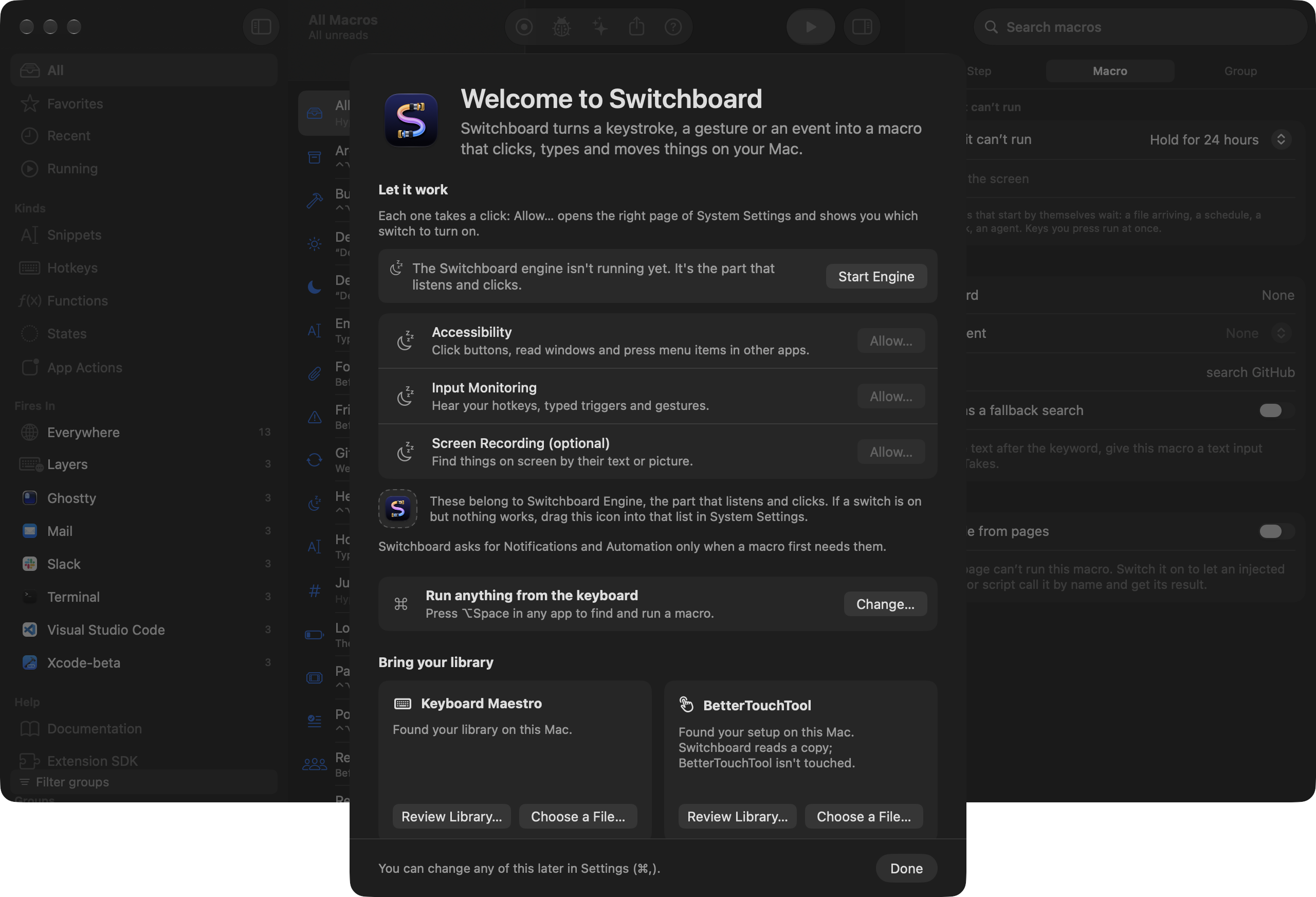
- Choose File › Import…, or the Bring your library step of the Welcome window.
- Read the review. Each macro is marked Ready, Needs a look or Not supported, with notes.
- Turn groups on one at a time, or quit the old app and import with Take over so its hotkeys move across.
What comes across
| App | What comes across | Guide |
|---|---|---|
| Keyboard Maestro | 743 names mapped. every macro: actions, conditions, triggers, tokens and calculation functions. Groups arrive turned off until you take over. | Coming from Keyboard Maestro |
| BetterTouchTool | 1217 names mapped. keyboard, gesture and mouse triggers with their actions, and window actions that match a preset. | Coming from BetterTouchTool |
| Karabiner-Elements | simple and complex modifications as remaps, dual-role keys, per-app groups and layers. | Coming from Karabiner-Elements |
| Alfred | workflows, web searches, snippets and feature hotkeys, with their keywords working in ⌥Space. | Coming from Alfred |
| Raycast | script commands, quicklinks and snippets. The review says which parts Raycast keeps encrypted. | Coming from Raycast |
| LaunchBar | actions, with their keywords and arguments. | Coming from LaunchBar |
| Hazel | each watched folder’s rules as one macro, in Hazel’s order, over real file steps. | Coming from Hazel |
| Automator and Shortcuts | Quick Actions, workflows and folder actions; every Shortcut as a palette row. | Coming from Automator and Shortcuts |
| TextExpander and text replacements | snippets with fill-ins and the system’s own replacements. | Coming from TextExpander and text replacements |
| PopClip | extensions as selection bar actions. | |
| Stylus | each style as a Site Kit, one CSS file per section, turned off until you look. | |
| Userscripts (Tampermonkey, Violentmonkey, Greasemonkey) | each script as a Site Kit with its @require and @resource files fetched. |
Read the docs
- Coming from AlfredHow Alfred's workflows, keywords, script filters, web searches and feature hotkeys map to Switchboard, and what the import keeps, notes or leaves out.
- Coming from Automator and ShortcutsHow Quick Actions, workflows, folder actions and Shortcuts become macros, which Automator actions turn into steps, and what still runs through Automator itself.
- Coming from BetterTouchToolHow every BetterTouchTool trigger and action maps to Switchboard, what runs in the Window extension, and what the import records or leaves out.
- Coming from HazelHow Hazel's folders, rules, conditions and actions map to Switchboard, and what the import keeps, notes or leaves out.
- Coming from Karabiner-ElementsHow Karabiner-Elements remaps, dual-role keys, layers and complex modifications map to Switchboard, and what the import keeps, notes or leaves out.
- Coming from Keyboard MaestroHow Keyboard Maestro's groups, triggers, actions, conditions, variables and tokens map to Switchboard, and how to import your library.
- Coming from LaunchBarHow a LaunchBar action becomes a macro with a palette keyword, which parts of LaunchBar's JavaScript API Switchboard provides, and what stays behind.
- Coming from RaycastHow Raycast's script commands, quicklinks, snippets and extensions map to Switchboard, and the hotkeys Raycast keeps encrypted.
- Coming from TextExpander or AlfredImport snippets from TextExpander, Alfred, Raycast or macOS Text Replacements, and how their placeholders map to Switchboard's snippet tokens.
- Getting startedInstall Switchboard, finish the first-run Welcome, grant the two permissions it needs and run your first macro.