Features › AI that shows its work
Make with AI and Fix with AI, with the cost shown
Describe a macro in a sentence and read what Claude wrote before anything is added or run, or point Fix with AI at a failed run’s trace. A model runs only when you ask. Every draft has a footer naming the model that wrote it and what it cost, and I made anything written by AI save turned off, so you read it before it can run. You can use your own Anthropic key or the AI plan, $8 a month, which Everything includes. A step called Ask AI to do it with tools lets a model work out a small job inside a macro using only the tools you name, and cloud steps stop when they reach the cap you set. An Ask later step parks a question in your Inbox with two to four buttons and a default, so a macro can wait for your answer without opening a window; if you never answer, the default is used after four hours.
Coming soon See pricing
What it does
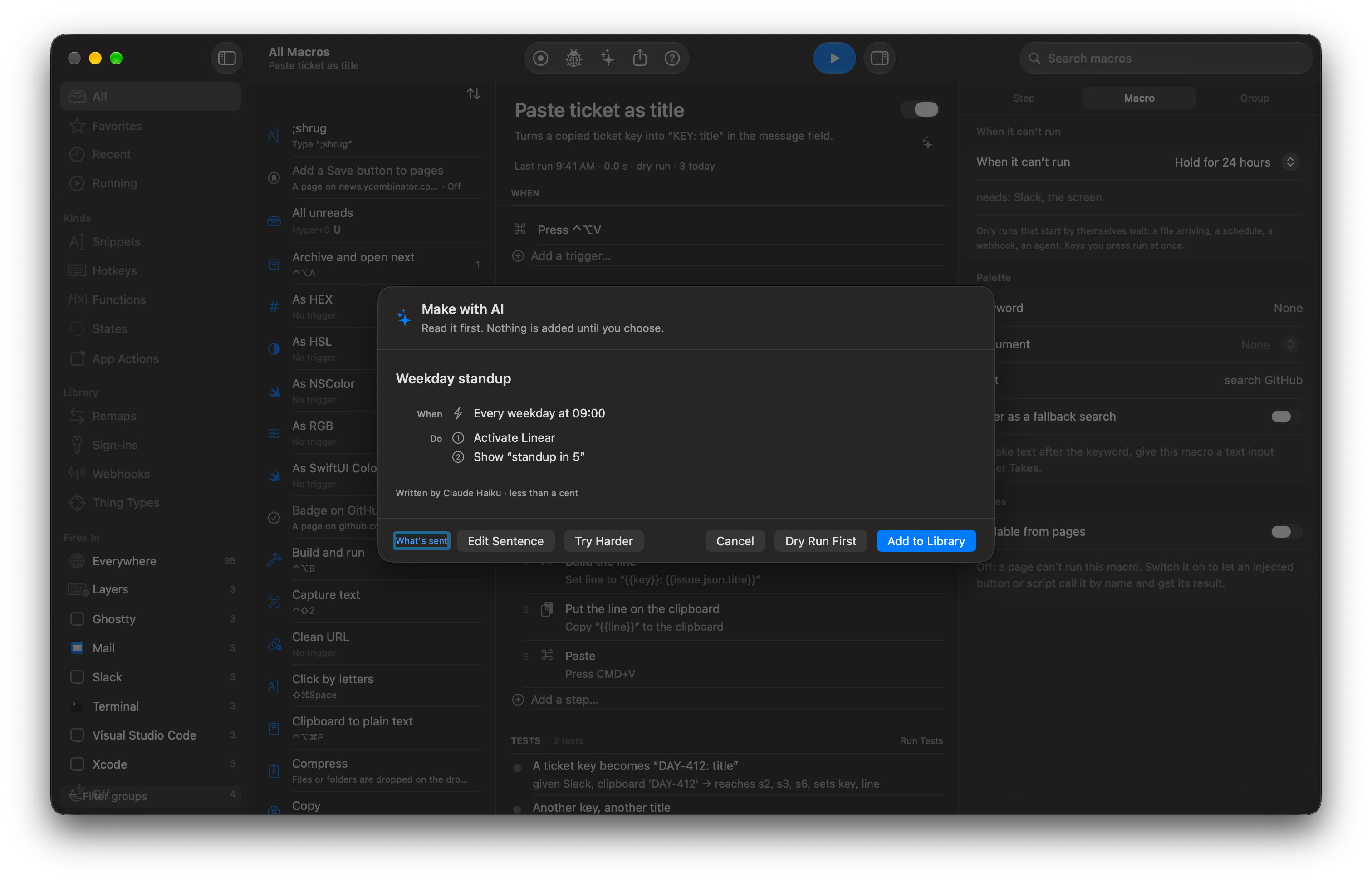
“Every weekday at 9:00 open Linear and show a HUD saying standup in 5.”
The draft arrives as When, Only if and Do rows, with the footer “Written by Claude Haiku · 0.3¢”. Add to Library saves it turned off, and Dry Run First rehearses it without clicking or typing.
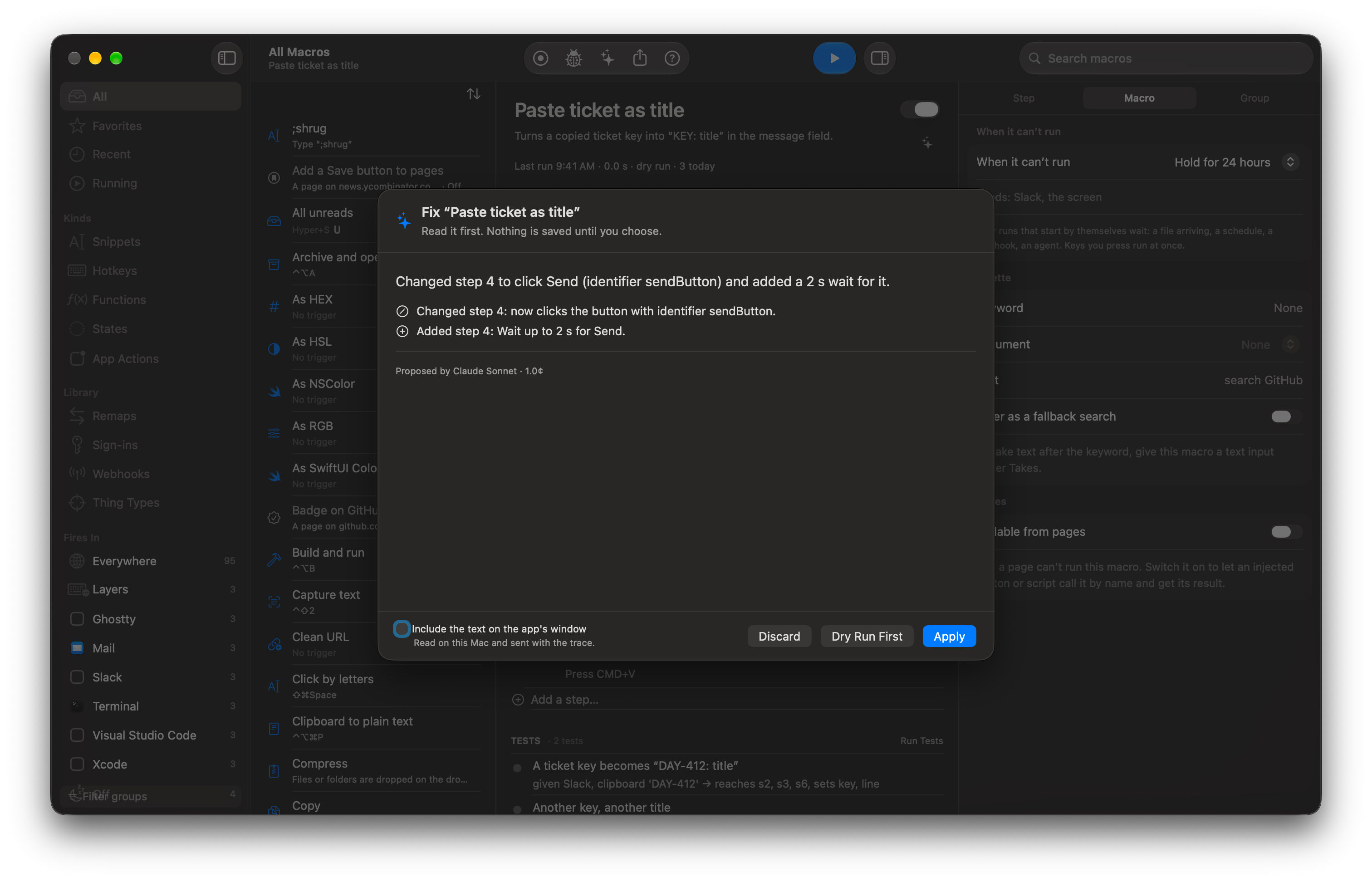
A macro that worked yesterday fails at step 4.
Fix with AI sends the macro and its failed trace, never your variable values or clipboard, and shows the change before saving. Apply is one Undo and a version in History; Dry run first shows each step’s result.
You record yourself renaming three files and stop.
Generalize turns the recording into a macro with a Repeat over the files, a wait where a window changed and the typed names as inputs. If the model tries to change a locator, a key or a script, the proposal is refused.
You imported a Keyboard Maestro library full of 0.5-second delays.
Tidy up with AI renames variables, folds waits into a wait for the element, and replaces repeated steps with a call to a macro you already have. It compares every step before and after and refuses the proposal if one changed meaning.
You are worried about the bill.
Set a monthly cap in Settings › AI and a daily cap per macro. A step that would go past the cap fails first with “AI budget reached: $4.80 of $5.00 today for this macro”, and the run follows its normal error path. Steps that run on your Mac cost nothing and are never counted or stopped.
You want a macro to work out a small job on its own.
Add the step Ask AI to do it with tools and choose Add Tool to pick the macros, extension actions or MCP server tools it may use. It can use nothing you didn’t list: a tool it makes up, arguments that don’t fit and a call past the limit are refused, and it is told why. The default is 8 calls and 60 seconds, and the most you can set is 32 and 300. Every call is a row under the step in Activity, the refused ones too, and a tool that can change something asks first. Pick the Mac’s own model for small jobs or a cloud model for harder ones.
How it works
- Press ⌃⌘M, type a sentence, and optionally limit it to one app with Works in.
- Read the draft. Switchboard checks it against the macro schema and lint rules and asks the model for one repair if it fails.
- Use your own Anthropic key, stored in your Keychain, or the Switchboard AI plan. A macro made with AI is always saved turned off.
Read the docs
- Make with AIDescribe a macro in a sentence and read what Claude wrote before anything is added or run.
- AI budgetsSee what AI steps cost, set a monthly cap and a daily cap per macro, and write macros that stop or take a cheaper path when the budget is gone.
- DebuggingHow to find out why a macro did not run, why it failed and what it would do, using Activity, traces, dry runs and the command line.
- PrivacyLists exactly what stays on your Mac, what goes to iCloud, what a shared macro leaves out, what the AI features send, and what an agent can see.
- Testing a macroShows how to save a run as a test, run tests and checks, and know a macro still works after an edit or a macOS update.
- Making an extension with AIDescribe an extension in a sentence, read the checked TypeScript Claude wrote and the permissions it asks for, try it, and install it in Develop mode.
- Ask AI to do it with toolsRuns a short, capped loop where a model uses tools you name (macros, extension actions, MCP tools) to reach an answer.
- Ask later (Inbox)Parks a question in the Inbox instead of a modal; the macro waits for any button, on the Mac or the iPhone, whenever you get to it.